FREE to use at https://totp.toolsforteaching.co.uk/
Students use authenticator apps every day and have no idea what is going on inside them. TOTP Visualizer opens the box.
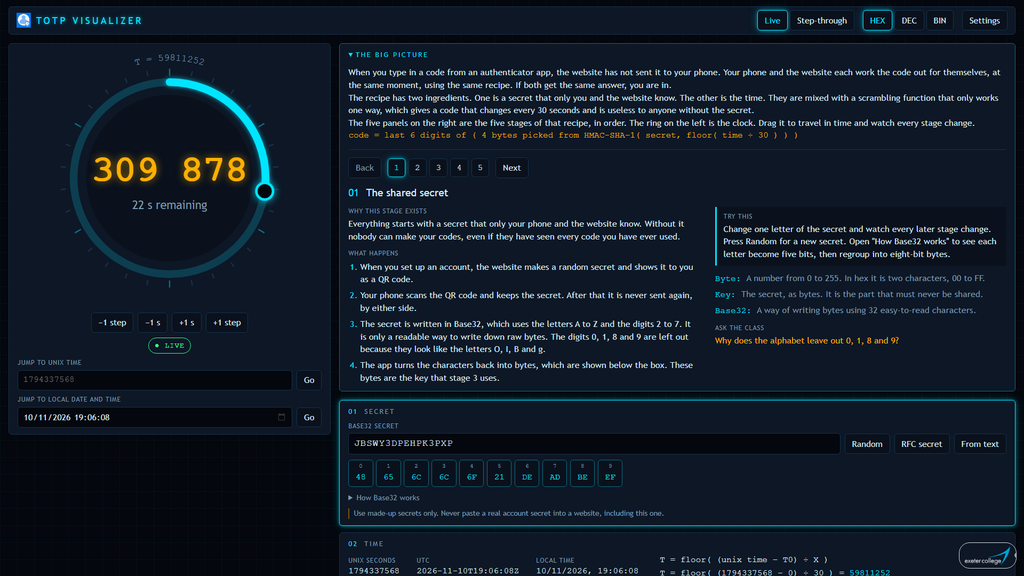
Type in a secret, or generate one, and the app shows every stage of the real algorithm. The secret is decoded into bytes. The clock is turned into a counter. A genuine HMAC-SHA-1 digest is calculated, four bytes are picked out of its twenty, and the result becomes the six-digit code. Nothing is faked. The codes match a real authenticator app and the published RFC 6238 test vectors, and you can prove it by scanning the QR code with your phone.
The centrepiece is a clock ring. It runs live, and you can grab it and drag backwards and forwards through time. Every time it crosses a step boundary, the digest changes almost completely and the truncation window jumps to a new position. A verification window shows how a server allows for clock drift and slow typing.
A teaching card sits beside the ring at all times. It explains the big picture, then each stage in turn: why it exists, what happens, something to try, key terms and a question for the class. Step-through mode freezes the clock so you can talk through each stage at your own pace.
The README includes a 60-minute lesson plan, seven activities with answers, common misconceptions and assessment ideas, so teachers who are new to the topic can use it with confidence. It suits students aged 16 to 19 on Level 2 and Level 3 computing and cyber security courses.
Runs entirely in the browser. Nothing is sent or stored. Free to use for non-commercial purposes under CC BY-NC-SA 4.0.