Visit: https://football.toolsforteaching.co.uk/login
FPL Data Lab is a browser-based coding sandbox that teaches real front-end development skills through live Fantasy Premier League data. Students write JSX and CSS in a proper code editor and see their component render instantly, with every run pulling genuine, current football data through a safe, teacher-controlled API. Browser-based, FREE resource.
FPL Data Lab was built for Further Education computing courses (NCFE Level 2, BTEC Level 3, T-Level) where the usual challenge is making programming feel like a real skill rather than a worksheet exercise. Instead of static exercises with made-up data, students work with live Premier League statistics, fixtures and player data, which changes week to week and gives them a genuine reason to write conditional logic, handle loading and error states, and think about how real applications consume an API.
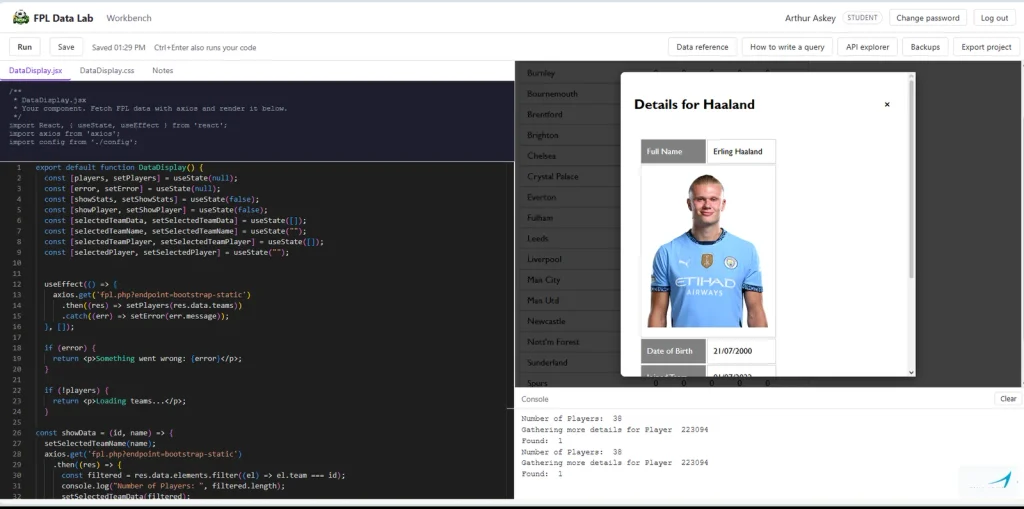
Each student gets their own workspace: a Monaco editor (the same engine behind VS Code) with tabs for their JSX, their CSS and a notes area, alongside a live output pane and a console panel that translates common beginner errors into plain English rather than the intimidating messages professional tools normally give. Code runs instantly in a sandboxed frame, so a mistake or an infinite loop never crashes the editor or costs a student their work. Saves are automatic and backed up, so recovering from an accidental deletion is never more than a couple of clicks away.
For teachers, the app is a classroom tool as much as a coding one. You get a dashboard listing every student, the ability to open and run anyone’s work exactly as they see it, and one-click access to their save history if you need to see how a piece of work progressed or roll back an accidental loss. There is no separate marking environment to juggle: you are looking at the same live component the student built, with the same real data behind it.
Because everything runs through a single, whitelisted API proxy that the app controls, students can explore real data freely without any of the usual risks of letting learners make arbitrary network requests, and there is nothing to install locally beyond a browser. Finished work can also be exported as a complete, runnable project, so a strong student’s coursework does not have to live and die inside the classroom sandbox: they can take it away, open it in their own tools, and keep building.
The result is a teaching environment that keeps the safety and structure of a controlled classroom tool while giving students the genuine experience of building against a real, live API, which is exactly the muscle they need for the assessment criteria in these qualifications and for whatever they do next.
You will need to install it on your own server as it requires student access and so comply with your confidentiality requirements.