I usually develop Office extensions in response to a given need. My mentor suggested that an on-screen timer would help keep the time limit in my student’s mind when they undertook an activity. There are many web-based solutions available, such as https://classroomscreen.com and sometimes there are timers you can call up on the Smart TV display (although not consistantly).
There are no easy solutions for keeping it within PowerPoint. The age of the ActiveX control is dead due to security concerns, so the only viable solution within PowerPoint is a VBA only solution. There are a number of technical issues with this (look away now if you are a teacher looking for a solution and not a Computer Science teacher):
- There is no inbuilt timer within PowerPoint, so you have to use a Windows system timer. This is why this solution has to be Windows-only, sorry.
- Assigning Macros back and forth between compiled .ppam (PowerPoint Add-ins) and the Template is unreliable and relies on code inside the Template which is not always possible.
- The solution is to manage it all in the .ppam and add a “Live Manager” dialog box which remains on screen and is used to set and fire off the timer.
(non-technical teachers can come back now)
The function is part of my Macro Extension CodeMonkey_PPT.ppam
When that extension is installed as a PowerPoint Extension, a new toolbar is visible and there is an option to “Run Live” at the right

This opens up a dialog box and enables you to start your presentation. It remains on top of the presenter view while you are teaching.
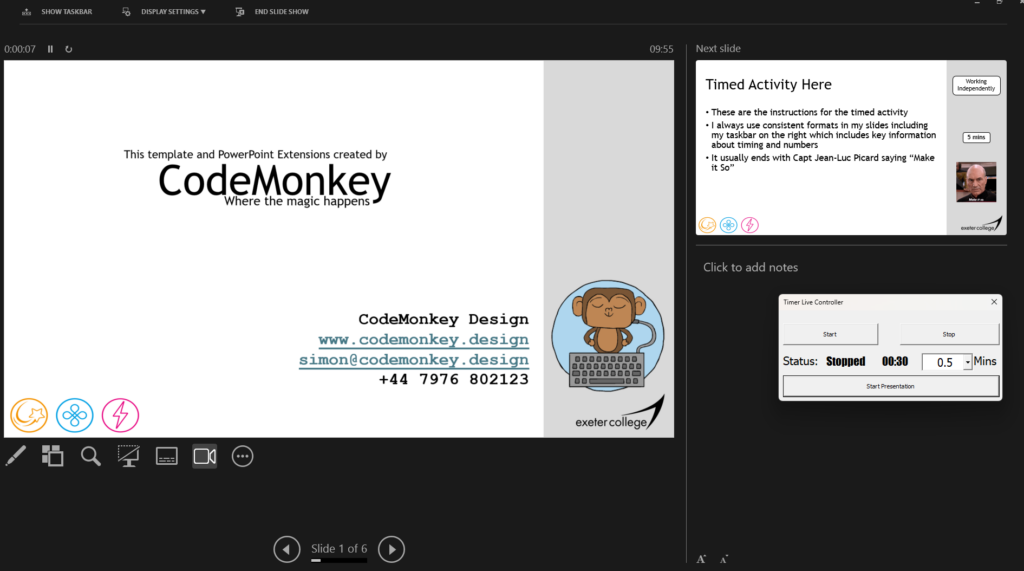
When you get to a slide where you want to have a timer, you select the time (between 30 seconds and 60 minutes) and hit Start

The timer runs for the required time and makes a system sound when the time is up

You can continue with the slide whilst it is running. If you have a slide which follows which already has a timer on it, and move to that slide the timer continues running. This means with a little preparation you can run a time over 2 or more slides!
I plan to release this shortly. Let me know if you are interested.
No responses yet